
Picture a plumbing company in Huntington that just launched a new website. The design is sharp, every service is listed, and the contact form works. Three months later, the phones are quiet. A search for “emergency plumber Huntington NY” shows competitors everywhere and the new site nowhere.
For a business in this position, finding ways to improve website visibility on Google becomes essential to attracting potential customers. It is one of the most common frustrations in SEO, and it rarely has a single cause.
| The short answer: you improve visibility on Google by making sure Google can access your pages, matching each page to what searchers want, strengthening existing content before adding more, keeping your site organized and technically sound, earning genuine credibility, and measuring results against business goals. Adding keywords is only a small part of that. |
Why Isn’t Your Website Showing Up on Google?
Start by separating two problems that look identical from the outside.
The page is not indexed. Google has not found it, cannot access it, or has chosen not to store it. In that case, it cannot appear in results at all.
The page is indexed but ranks too low. Google knows it exists, but other pages look more relevant, more useful, or more trustworthy for the query.
The fixes are completely different, so diagnosing the right problem first saves weeks of wasted effort. Three terms help here. Crawling is Google visiting a page. Indexing is Google storing and understanding it. Ranking is Google deciding where it appears for a specific search.
Step 1: Confirm Google Can Find and Index Your Pages
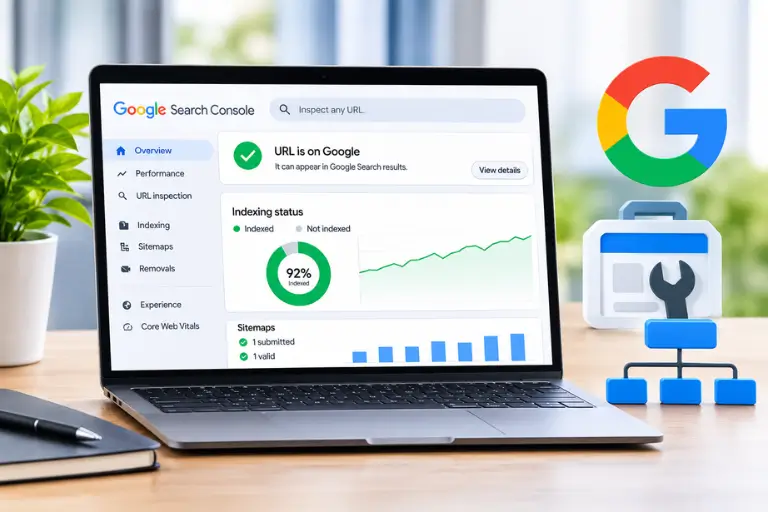
Google Search Console is free, and it shows what Google actually sees rather than what you assume. Use it to check:
- Whether your most important pages are indexed (the URL Inspection tool shows this page by page).
- Whether Google has discovered the URLs you care about.
- Whether a stray noindex tag or a robots.txt rule is blocking visibility, which often happens when a staging setting survives a site launch.
- Whether your XML sitemap exists and was submitted without errors.
- Whether key pages are reporting technical errors.
A sitemap helps Google discover pages, but it does not guarantee indexing, and not every URL needs to be indexed. Login pages, thank-you pages, and filtered duplicates usually should not be. If important pages are missing, our guide to technical issues that stop Google from indexing a website walks through the most common causes.
Step 2: Match Your Content to What People Search For
A page can include the right keywords and still underperform if it does not answer the searcher’s real question.
Take an HVAC contractor on Long Island. Someone searching “AC repair near me” is probably ready to call. Someone searching “how much does a new central air system cost” is researching. Someone searching “ductless vs central air” is comparing options. One generic services page cannot serve all three. A repair page with service areas, response times, and what to expect during a visit serves the first. A pricing explainer serves the second.
To read intent, search your target term and see what Google already shows: service pages, guides, or comparisons. That mix tells you the format searchers expect.
Then use your main term naturally where it belongs: the page title, main heading, opening paragraph, and service descriptions. Related phrases will appear on their own when you write for the customer’s question. If a sentence reads awkwardly because a keyword was forced in, rewrite it.
Step 3: Improve Existing Pages Before Publishing More
More blog posts do not automatically mean more visibility. Often the fastest gains come from pages you already have. Open the Performance report in Search Console and look for these patterns:
| What you see | Likely cause | What to try |
|---|---|---|
| Many impressions, few clicks | Title does not match the query | A clearer, more specific title tag |
| Stuck on page two | Content thinner than competitors | Answer more questions; add internal links |
| Traffic fading over time | Outdated information | Refresh facts, examples, and details |
| Visits but no enquiries | Page skips customer concerns | Add process, FAQs, and a clear next step |
The rule is simple: every change should address a specific weakness. Rewriting titles at random makes it impossible to learn what worked.
Step 4: Build a Structure That Helps Google and Visitors
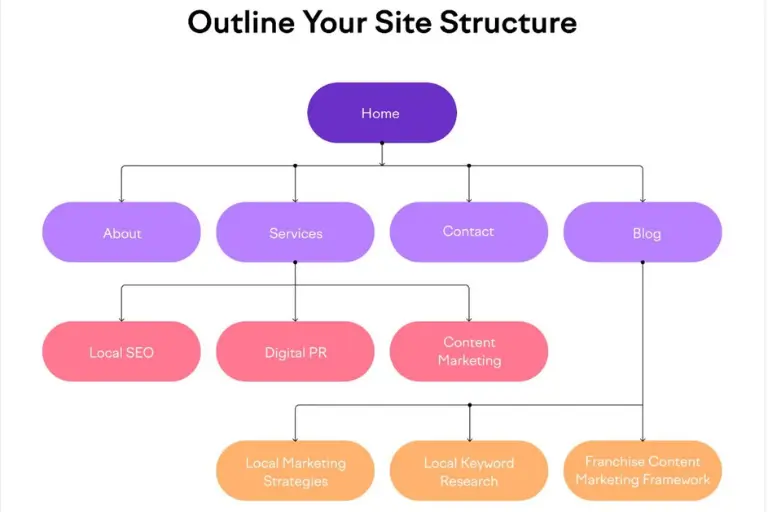
Your site structure shows Google how pages relate to each other, and it shows visitors where to go next. Keep navigation logical, with clear service categories and descriptive URLs such as /ac-repair rather than /page-47.
Then connect main service pages with supporting content. A plumbing company’s drain cleaning page can link to a blog post about recurring clogs, and that post can link back to the service page.
Resist creating many near-identical pages for slightly different keywords. Separate pages for “plumber Nassau,” “plumber in Nassau County,” and “Nassau plumbing” usually create duplication, not visibility. Location pages work when each one offers genuinely distinct information, such as the areas actually served.
If the layout itself makes this hard to fix, a planned website design and development project can build the structure in from the start.
Step 5: Remove Technical Friction
Technical problems rarely sink a site alone, but they make everything else harder. Prioritize these:
- Mobile usability. Many searches happen on phones, so text size, tap targets, and layout must work on a small screen.
- Page speed and Core Web Vitals. Slow or shifting pages frustrate visitors, which costs enquiries whatever the ranking effect. Search Console shows which pages need attention.
- Broken links and redirect chains. Dead internal links waste visitors’ time, and long redirect chains slow crawling.
- Duplicate URL versions. If http, https, www, and non-www versions all load, Google must guess which counts. Redirect to one version and use canonical tags to point duplicates at the preferred page.
- HTTPS. A secure connection protects visitors and is a baseline expectation.
Start with what Search Console flags rather than chasing a perfect score everywhere. A technical review within SEO services can sort issues by priority.
Step 6: Build Credibility Google Can Recognize
Google tries to surface sources people can trust. That trust builds through useful content from people who understand the subject, accurate business details, and references from reputable websites.
Links from other sites still matter, but quality beats quantity. A mention from a local chamber of commerce, a supplier, or a news story about your business carries more weight than hundreds of directory listings. Buying links is risky and can cause more harm than good.
Stay focused on what you genuinely know. A roofing company writing in depth about roof repair will build a stronger site than one covering every home topic. Social media can help people discover your work, but it is not a ranking guarantee.
Common Mistakes That Limit Organic Performance
- Publishing blog posts without deciding which pages they support.
- Targeting the same intent with several similar pages.
- Judging success by rankings alone instead of enquiries.
How to Measure Progress and Decide What to Fix Next
Review Search Console and analytics monthly. Track impressions, organic clicks, queries, and which pages are gaining or losing visibility. Then look past traffic to organic landing-page engagement, conversions, and the calls, forms, and booking requests organic search produces.
One caution: average position is an aggregate. A page showing position 7 may rank higher for some searchers and lower for others depending on location and device, so use it to spot direction, not exact placement.
The most useful question is whether visibility brings the right visitors. Rising traffic with no calls usually points to a page, intent, or conversion problem, which we cover in why a website can get traffic but no leads. Since organic results take time, some businesses also run Google Ads management alongside SEO to bring in enquiries while visibility builds.
Frequently Asked Questions
How long does it take to improve website visibility on Google?
It depends on competition, site history, and what needs fixing. Indexing fixes can show results within weeks, while competitive rankings often take months. No one can promise a timeline.
Do I need to publish blog posts to rank?
Not necessarily. Helpful posts support visibility when they answer real questions and connect to service pages, but improving existing pages often comes first.
Should every service area have its own page?
Only if each page offers distinct, useful information. Near-duplicate location pages add clutter without adding value.
Where to Start This Week
You do not need to fix everything at once. Begin with three actions:
- Open Search Console and confirm your five most important pages are indexed.
- Find one page with plenty of impressions but few clicks, and rewrite its title and opening to match what searchers want.
- Add two or three relevant internal links from related pages to your main service page.
Then give the changes several weeks before adjusting more. If you want an experienced second opinion on what to prioritize, you can contact the Long Island SEO team.